
Why we should learn Computer Network?
In today’s world, it’s really important to understand computer networks because they help make almost everything we do online possible. A computer network is like a group of roads that lets information travel between devices like computers, phones, and tablets. Because of these networks, we can use the internet, watch movies, play games online, and talk to people anywhere in the world. Most jobs and schools also use networks for things like video calls and sharing information. Without networks, none of these things would work. Learning about how networks work helps us understand how we stay connected, how information moves safely, and how to fix problems like slow internet or weak signals. Plus, knowing about networks can help you get jobs in technology and cybersecurity, which are growing fields.
Let’s understand what computer network is?
Computer Network
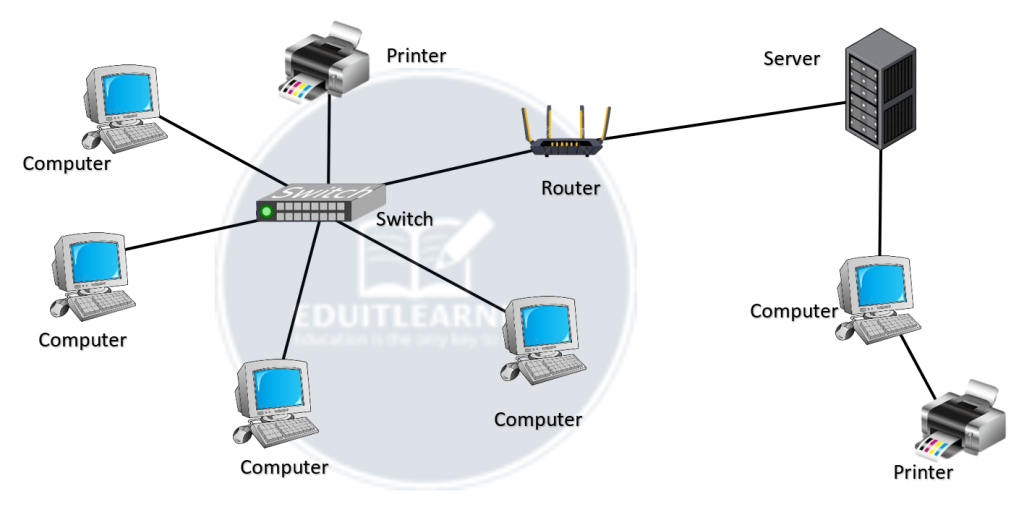
When two or more computer or devices (such as printers, servers, or other hardware) are connected with each other. Network can be wired(using cables) or wireless(using Wi-Fi, Bluetooth etc.). The purpose of network is to share resources, communicate, and enable the exchange of information between devices.
For example:
- Resources: Sharing printers, storage drives, or internet connections.
- Communication: Sending emails, sharing files, or video conferencing.
- Information Sharing: Accessing a shared database or collaborating in real time.
Types of Networks
- PAN(Personal area network): – A network designed for individual(personal) use. It is used for personal communication between devices. It is smaller network as compare to all other network, ranges from 10-20 meters. It connects smartphones, laptops, smartwatches and tablets. For example, a smartphone connected to Bluetooth device, a laptop connected to a wireless mouse or printer using Bluetooth or Wi-Fi.
- LAN (Local area network): – A network that connects devices within a small geographical area, such as home, office, building, or a campus. It provides fast and reliable communication between devices within the same area. Typically, it covers up to a few kilometers. Example: An office network where multiple computers and printers are connected to a router for sharing resources and internet access.
- MAN(Metropolitan Area Network): – A network that connects multiple LAN. It connects large area such as city, college, and campus (10-20 Kilometers). It is used by large organizations or network service providers to connect multiple LANs. Example: A city-wide Wi-Fi network, a university campus network connecting several buildings, or a large company’s network spanning several locations within a city.
- WAN(Wide are Network): – It connects multiple MAN. It connects large geographical area such as cities, country or even connects whole world. Example: The internet is the largest example of a WAN, connecting networks all over the world. A company’s global network that connects offices in multiple countries is also an example.
Components of Network
- Nodes: – Any devices (such as Computers, printers, servers, laptops, smartphones) connected in the network called nodes. It acts as the source and destination for data transmission.
- IP address: – A unique identifier assigned to each node(devices) in the network. It is used for communication between different networks. It helps identifying a specific node in the network for data communication. It is a logical address that helps to know where the device is in a Network. It can change when you connect to different network. For example, your IP address will change when you connect from one Wi-Fi to another.
- MAC(Media Access Control) address: – It is a unique identifier assigned to Network interface card (NIC) of a device. It is permanent address that cannot be changed by the user. It is used to identify devices in a local area network (LAN).
- Switch: – A networking device that connects multiple nodes(devices) in a LAN. It is smarter device as it forwards data between devices based in their MAC address.
- Hub: – A networking device that connected multiple nodes(device) in a LAN but it broadcasts the data as it cannot recognize devices with their MAC address.
- Routers: – A networking device that connected different networks to each other and routes data packets between them.
- Client: – A device or a software that request for the resources or data to the server. It interacts with the server to perform a specific task such as accessing websites, downloading files or retrieving information stored on the server.
- Server: – A powerful computer that provides services to the client. It stores huge amount of data and responds to client requests by sharing the requested resources or information.
Conclusion
Understanding computer networks is essential in today’s interconnected world. Networks allow us to access the internet, share information, communicate with others, and utilize a variety of services. From small-scale PANs used for personal devices to large-scale WANs that connect the entire globe, networks are the backbone of modern communication systems. Learning about networks helps us understand how data is transmitted, how devices interact, and how to ensure security and efficiency in communication. Whether you are interested in technology, cybersecurity, or simply want to understand how devices communicate, knowledge of computer networks is crucial for navigating and thriving in the digital age.
Important Questions
1. What is a computer network?
Answer: A computer network is a system that connects multiple devices like computers, printers, smartphones, or tablets, allowing them to share resources, communicate, and exchange information. These devices can be connected through wired (Ethernet) or wireless (Wi-Fi, Bluetooth) technologies.
2. Why are computer networks important in today’s world?
Answer: Computer networks are crucial because they enable us to access the internet, communicate with others via email or video calls, and use cloud-based applications. Without networks, many services, including online shopping, banking, and social media, would not be possible. They also play a key role in business and education, enabling global communication and collaboration.
3. What is a PAN (Personal Area Network)?
Answer: A PAN is a small network designed for personal use, typically covering a short range of about 10-20 meters. It connects devices like smartphones, laptops, smartwatches, and tablets, using technologies like Bluetooth or Wi-Fi. For example, connecting a smartphone to a Bluetooth speaker or a laptop to a wireless mouse.
4. What is the difference between LAN and WAN?
Answer: A LAN (Local Area Network) connects devices within a small area, like a home or office, and typically spans up to a few kilometers. It provides fast communication and resource sharing within that space. On the other hand, a WAN (Wide Area Network) connects multiple LANs across a larger geographical area, such as cities, countries, or even the entire world. The internet is the largest example of a WAN.
5. What is a Router and how does it work?
Answer: A router is a networking device that connects different networks and directs data between them. It routes data packets from one network to another, such as from a home network to the internet. It ensures that data finds the correct path to reach its destination. Routers are also responsible for assigning IP addresses and handling network traffic.
6. What is an IP address and how is it used in a network?
Answer: An IP address is a unique identifier assigned to each device connected to a network. It allows devices to identify each other and communicate. An IP address can either be static (fixed) or dynamic (changes when a device connects to different networks). It works like a postal address for devices, helping data to reach the correct destination.
7. What is a MAC address and how does it differ from an IP address?
Answer: A MAC address (Media Access Control address) is a permanent, unique identifier assigned to the network interface card (NIC) of a device. It is used within a local network (LAN) to identify devices. Unlike an IP address, which can change depending on the network, a MAC address is fixed and cannot be altered by the user.
8. What is the role of a Switch in a network?
Answer: A switch is a networking device used to connect multiple devices in a local area network (LAN). It works by forwarding data only to the device that requires it, using the device’s MAC address. This makes it more efficient than a hub, which broadcasts data to all connected devices. Switches help optimize network traffic by reducing congestion.
9. How does a Hub differ from a Switch?
Answer: A hub is a basic networking device that connects multiple devices in a LAN. Unlike a switch, which sends data only to the specific device that needs it, a hub broadcasts the data to all devices in the network. This can lead to data collisions and slower speeds, making hubs less efficient than switches in modern networks.
10. What are the key components of a computer network?
Answer: The key components of a computer network include:
- Nodes: Devices like computers, printers, and servers connected in the network.
- IP Address: A unique identifier for each device in the network.
- MAC Address: A permanent identifier for the network interface card (NIC) of a device.
- Switch: A device that connects multiple devices in a LAN and forwards data based on MAC addresses.
- Router: A device that connects different networks and routes data packets between them.
- Server: A computer that provides resources or services to clients.
- Client: A device that requests resources or data from a server.