
Computer Memory
In the world of computers, memory plays a crucial role in storing and managing data that the system needs to run programs and process information.
Computer memory includes different types such as RAM, which provides fast temporary storage for active tasks, and storage memory like hard drives or SSDs, which hold data permanently.
Understanding how memory works helps in optimizing computer performance and ensures smooth operation of software and applications.
Click to Enroll Free Computer Fundamental Course
What is Computer Memory?
Computer memory is a hardware part of the computer that stores data and instructions. The CPU (Central Processing Unit) uses this memory to hold information that it needs to work on. Without memory, the CPU cannot do anything because it needs data and instructions to process.
Memory holds two main things:
- Data: Numbers, text, or any information that the computer processes.
- Instructions: Commands or programs that tell the computer what to do.
Why Do We Need Memory?
When the computer runs a program, the CPU reads the program’s instructions and the data from memory. It then processes the data and writes back results to memory. This process happens very fast and constantly while the computer is on.
There are two types of memory:
- Primary Memory: Memory that the CPU directly uses.
- Secondary Memory: Memory that stores data and programs permanently.
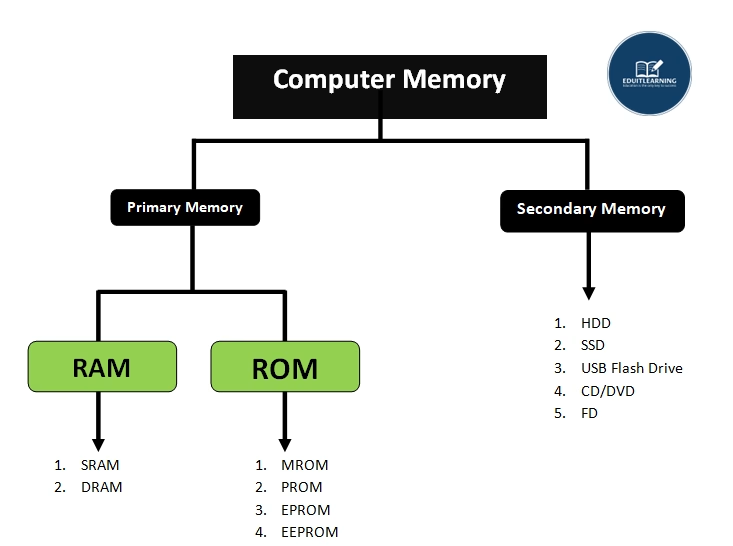
Types of Memory
1. Primary Memory
Primary memory is the main memory of the computer. It works directly with the CPU. It stores data and instructions that the CPU needs immediately while running programs.
Primary memory is:
- Fast: CPU can quickly read and write data here.
- Volatile: This means data is lost when the power is turned off.
- Limited in size compared to secondary memory.
- More expensive per unit of storage than secondary memory.
- Communicate Directly with CPU
Two major types of primary memory are:
1. RAM
It stands for Random Access Memory. It is the type of primary memory that stores temporary data. Its stores data that is currently used by CPU. It allows the CPU to read and write data quickly. It is a volatile memory, means when the computer shuts down, everything in RAM is lost.
Types of RAM
a. DRAM
It stands for Dynamic Random Access Memory. It is a type of computer memory that temporarily stores data which the CPU is actively using. It holds data dynamically, meaning the stored information needs to be refreshed constantly to prevent loss. DRAM is used as the main memory in most computers because it is fast and cost-effective for storing data temporarily while programs run.
b. SRAM
It stands for Static Random Access Memory. It stores data that the CPU uses frequently, so the CPU doesn’t have to go to the slower DRAM every time. SRAM is faster and more expensive than DRAM. It does not need constant refreshing like DRAM. Because it is fast, SRAM is mostly used as cache memory inside the CPU to store frequently used data.
2. ROM
ROM stands for Read-Only Memory. It is a type of computer memory that stores data permanently. Unlike RAM (like DRAM or SRAM), the data stored in ROM does not get lost when the computer is turned off. This means ROM keeps its information even without power.
- ROM stores important instructions and data that a computer needs to start up or boot.
- For example, it contains the BIOS or firmware, which helps the computer load the operating system when you switch it on.
- Since the data is permanent, it cannot be easily changed or erased.
Types of ROM
i. MROM
MROM stands for Mask Read-Only Memory. It is a type of ROM where the data is permanently written during the manufacturing process. This means the data is “masked” onto the chip and cannot be changed or erased later. When the chip is made, the information is physically built into the silicon. The CPU can only read the data stored in MROM.
ii. PROM
PROM stands for Programmable Read-Only Memory. It is a type of ROM that comes blank from the factory and can be programmed (written) once by the user or manufacturer after production. Once programmed, the data in PROM cannot be changed or erased.
Using a special device called a PROM programmer or burner, you can “burn” data onto the chip by changing some bits from 1 to 0. This programming is permanent — once a bit is changed, it cannot be reversed. After programming, the CPU can read the stored data but cannot modify it.
iii. EPROM
EPROM stands for Erasable Programmable Read-Only Memory. It is a type of ROM that can be programmed and erased multiple times. Unlike PROM, EPROM can be erased by ultraviolet (UV) light, so you can reuse the chip by erasing old data and writing new data.
To erase the data, you remove the chip from the device and expose it to strong UV light through a small transparent window on the chip. The UV light clears all the stored data, making the chip empty again.
iv. EEPROM
EEPROM stands for Electrically Erasable Programmable Read-Only Memory. It is a type of non-volatile memory like EPROM, but with an important difference: you can erase and write data electrically without removing the chip from the device. This makes it much easier and faster to update data stored in EEPROM.
2. Secondary Memory
Secondary Memory (also called secondary storage) is the type of memory used to store data and programs permanently on a computer or device. Unlike primary memory (like RAM), which is fast but temporary, secondary memory keeps data even when the power is turned off.
Purpose of Secondary Memory:
- To store large amounts of data and programs that don’t fit in primary memory.
- To keep data safe and permanent for long-term use.
- Used for storing everything like your documents, photos, videos, software, and the operating system.
Characteristics:
- Non-volatile: Data stays stored even when power is off.
- Slower than primary memory: Reading/writing data is slower than RAM.
- Large capacity: Can store much more data than primary memory.
- Cheap: Cost per byte is lower compared to RAM.
Types of Secondary Memory
1. HDD
It is a type of secondary memory that stores data permanently. It can store a huge amount of data. It is non-volatile memory, which means data will not be deleted even when the computer is turned off, unlike RAM.
HDD stores data on disks called platters. There can be one or more platters in a single HDD. The platters have tracks and sectors. Data is stored in sectors. Usually, one sector stores 512 bytes of data.
The platters spin very fast, usually 7200 times per minute. They spin so that an arm with a read/write head can move across the platters to read or write data into the sectors.
2. SSD
SSD stands for Solid State Drive. It is a type of secondary memory that stores data permanently, just like an HDD. But unlike HDD, SSD does not have any moving parts. Instead of spinning disks, SSD uses flash memory chips to store data.
Because SSD has no moving parts, it is much faster than an HDD when reading and writing data. It can access data almost instantly, which makes the computer start up faster and programs run smoother.
SSD also stores data in a non-volatile way, meaning the data stays saved even when the computer is turned off.
Since SSD uses memory chips, it is more durable and less likely to get damaged if the computer is moved or dropped.
3. USB Flash Drive
A USB Flash Drive is a small, portable device used to store data permanently. It uses flash memory chips, similar to an SSD, to save data without needing power. You can plug it into a computer’s USB port to transfer files easily.
USB Flash Drives don’t have any moving parts, so they are fast and durable. They are used for carrying documents, photos, videos, and other files from one computer to another.
Because it is small and portable, a USB Flash Drive is very convenient for backing up data or quickly sharing files.
Most Important Questions
1. What is the difference between Primary Memory and Secondary Memory in terms of speed, cost, and usage?
Primary memory is directly accessed by the CPU and is used to store data and instructions that are currently being executed. It is very fast, but also expensive and has limited storage capacity. It is volatile, meaning data is lost when power is off.
Secondary memory is used for long-term data storage and is not directly accessed by the CPU. It is slower than primary memory but much cheaper and provides large storage capacity. It is non-volatile, so data is preserved even after the system shuts down.
2. Why is RAM called “Random Access Memory”?
RAM is called Random Access Memory because the CPU can access any memory cell directly and instantly without following a sequence. All locations in RAM are equally accessible, which makes data retrieval and processing much faster compared to sequential access memories like tapes.
3. What are the key differences between SRAM and DRAM?
SRAM (Static RAM) stores data using flip-flops and does not need to be refreshed, which makes it faster. It is used in CPU cache. However, it is more expensive and consumes more space.
DRAM (Dynamic RAM) stores data using capacitors and needs to be constantly refreshed, which makes it slower. It is cheaper and more compact, so it is commonly used in system memory (main RAM).
4. What is the role of ROM in the booting process?
ROM (Read-Only Memory) contains permanent instructions that are used to start the computer, known as firmware or BIOS. When the computer is powered on, the CPU accesses the ROM to execute the bootloader, which initializes hardware and loads the operating system into RAM. ROM ensures that the system can start even without a storage drive.
5. How does Flash Memory differ from traditional ROM?
Traditional ROM is fixed and cannot be modified easily after manufacturing. Flash memory, a type of EEPROM, can be electrically erased and rewritten. It retains data even without power and is widely used in USB drives, SSDs, and memory cards. It is more flexible and efficient for modern storage needs compared to old ROM types.
6. What is the importance of Cache Memory and where is it located?
Cache memory is a small, high-speed memory located inside or very close to the CPU. It stores frequently accessed data and instructions to reduce access time. Cache reduces the gap between the speed of the CPU and RAM. It is divided into L1, L2, and sometimes L3 levels, with L1 being the fastest and closest to the CPU core.
7. Why is secondary memory non-volatile and what advantages does this offer?
Secondary memory is non-volatile, meaning it retains data even when power is off. This allows permanent storage of the operating system, software applications, and user data. It provides a reliable and stable way to store data over time without needing constant power, making it essential for long-term usage.
8. How does SSD perform better than HDD, and what type of memory does it use?
SSDs use NAND-based flash memory, which has no moving parts. This makes them faster, more durable, and less power-hungry compared to HDDs, which use spinning magnetic disks. SSDs offer faster boot times, quicker file access, and better overall system responsiveness.
9. What is the functional difference between PROM, EPROM, and EEPROM?
PROM (Programmable Read-Only Memory) can be written once and not erased.
EPROM (Erasable Programmable ROM) can be erased using ultraviolet light and reprogrammed.
EEPROM (Electrically Erasable Programmable ROM) can be erased and reprogrammed using electricity without removing the chip from the system. EEPROM is more flexible and is commonly used in modern firmware applications.
10. Can a system work without secondary memory? Justify your answer.
Yes, a system can technically operate without secondary memory, but only in limited scenarios. For example, embedded systems or microcontrollers with ROM and RAM can run without secondary storage. However, in general-purpose computers, secondary memory is essential for storing the operating system, user files, and software. Without it, the system cannot save data or run modern applications beyond basic functions.