
Semantic and Non-Semantic Tags
In this article, we will talk about semantic and non-semantic tags in HTML.
We’ll learn:
- Why HTML structure matters?
- What are Semantic Tags?
- What are Non-Semantic Tags?
- Why Semantics Matter in SEO & Accessibility?
- Comparison between Semantic and Non-Semantic tags.
Let’s get started and make HTML easy to understand!

Why HTML Structure Matters?
In HTML, structure refers to how the elements (tags) are arranged and organized in a webpage. A clear and correct structure helps both browsers and users understand the content better.
1. Improves Readability and Maintainability
A properly structured HTML document is easier for developers to:
- Read and understand
- Update in the future
- Debug if there’s an error
For example, separating sections using proper tags like <header>, <main>, and <footer> makes it clear what each part of the page does.
2. Boosts SEO (Search Engine Optimization)
Search engines like Google use the HTML structure to understand what your page is about. Semantic tags (like <article>, <nav>, <section>) help search engines:
- Identify important content
- Index your pages more accurately
- Show better results to users
3. Enhances Accessibility
Screen readers (used by visually impaired users) rely on a meaningful structure to read the page aloud. If the structure is correct:
- The content makes sense when read out loud
- Users can navigate more easily using assistive technologies
4. Supports Styling and Scripting
CSS and JavaScript work more efficiently when the HTML is well-structured. It becomes easier to:
- Target specific elements using classes or IDs
- Apply consistent styling across similar sections
- Add interactivity with minimal code
5. Ensures Browser Compatibility
Browsers render content based on the structure of HTML. If the structure is invalid or messy:
- Some elements may not display correctly
- Layout issues may occur on different devices or browsers
What are Semantic Tags in HTML?
Semantic tags are HTML tags that clearly describe the meaning or purpose of the content inside them.
semantic means “with meaning.” So, a semantic tag tells both the developer and the browser what the content is about.
Let’s break it down step by step.
1. Why Are They Called “Semantic”?
The word “semantic” comes from “meaning.”
When you use semantic tags, you’re telling the browser, “Hey, this part is a heading” or “This section is a navigation bar” or “This area is the main content.”
This helps:
- Browsers understand how to display it
- Search engines understand what’s important
- Screen readers (used by blind users) read the content properly
- A semantic tag (like <header>, <footer>, <article>, etc.) clearly tells you what the content is for.
Example:
<article>This is a blog post</article>
Now, even without looking at the content, we know it’s a blog post, because it’s inside an <article> tag.
2. Why Should You Use Semantic Tags?
Using semantic tags has many benefits:
a) Improves Code Readability
When other developers (or even future-you) read your HTML code, it’s easier to understand.
Instead of seeing this:
<div id=”header”>
<div id=”nav”>
<div id=”main”>
You can write this:
<header>
<nav>
<main>
This is much cleaner and meaningful.
b) Helps Search Engines (SEO)
Search engines like Google look at your HTML tags to decide what your page is about.
Using semantic tags helps them:
- Index your site correctly
- Show your site in search results more accurately
c) Better for Accessibility
People who can’t see use screen readers. These tools read your HTML and speak it aloud.
If you use proper tags, the tool can say:
- “This is the main content”
- “This is a navigation menu”
- “This is a footer”
This gives a better experience for disabled users.
d) Future-Proof Your Code
Browsers and tools are built to understand semantic tags better. They may add new features, improve performance, or give better support in future updates if your code is semantic.
Semantic Tags
| Tag | Meaning (in simple words) |
<header> | Top part of the page (like a title or logo) |
<nav> | Navigation menu (links to other pages) |
<main> | Main content area of the page |
<section> | A section of content (like a chapter) |
<article> | An independent piece (like a blog post) |
<aside> | Side content (like ads or side notes) |
<footer> | Bottom part of the page (like copyright) |
<figure> | A picture or diagram with a caption |
<figcaption> | The caption for a figure or image |
<time> | Shows a date or time value |
<mark> | Highlights important text |
<address> | Contact information |
<summary> | Summary of collapsible content |
<details> | Expandable section for hidden content |
3. Do Semantic Tags Affect How the Website Looks?
No, not directly. Semantic tags don’t change the appearance of the webpage by default.
You need to use CSS to style them. But their main job is to add meaning, not design.
4. Where Are Semantic Tags Used?
You use semantic tags almost everywhere in an HTML document:
- Website layout (header, footer, main)
- Blog posts (article, section)
- Menus (nav)
- Images with captions (figure, figcaption)
They make the entire HTML page more understandable.
Conclusion
Semantic tags are like labels that explain what each part of your page does.
Without them, your HTML is just a pile of boxes.
With them, it becomes a well-organized, meaningful structure that is:
- Easier to read
- Easier to maintain
- Better for Google
- Better for users
What are Non-Semantic Tags in HTML?
Non-semantic tags are HTML tags that do not tell you what kind of content they contain. They are just general-purpose containers with no clear meaning.
Let’s understand step-by-step.
1. What Does “Non-Semantic” Mean?
The word “non-semantic” means “no meaning.”
So, non-semantic tags don’t tell anything about what’s inside them.
For example, if you see:
<div>This is something</div>
You have no idea what “something” is. It could be:
- A paragraph
- A form
- A sidebar
- A heading
- Or anything else
This is why it’s called non-semantic — it doesn’t give meaning to the content.
2. Why Are Non-Semantic Tags Used?
Even though they don’t have meaning, non-semantic tags are still very useful. Here’s why developers use them:
a) Flexible Containers
You can put any content inside a non-semantic tag. It acts like an empty box or a wrapper.
b) Grouping Elements
They help you group multiple elements together to apply styles or scripts.
For example:
<div class="card">
<h2>Title</h2>
<p>Description</p>
</div>
Here, the <div> groups the title and paragraph so you can style them as one unit.
c) Used with CSS and JavaScript
You can add classes or IDs to these tags to:
- Apply CSS styles
- Add JavaScript functionality
So even though the tags have no meaning, they become powerful when used with class names or IDs.
3. Common Non-Semantic Tags
Here are the most common non-semantic tags:
| Tag | Meaning (in simple words) |
<div> | A container or block-level box (used for layout) |
<span> | An inline container (used for small styling) |
1. <div>: It’s short for “division”. It’s used to create sections or blocks in a webpage.
Example:<div class=”footer”>This is footer</div>
2. <span>: It’s used for inline elements, like styling a single word or phrase inside a sentence.
Example:<p>This is a <span class=”highlight”>special</span>word.</p>
4. When Should You Use Non-Semantic Tags?
You should use non-semantic tags when:
- There is no suitable semantic tag for your content
- You are just grouping elements for design or scripting
- You want full control using CSS or JavaScript
- You are creating custom layouts that don’t fit standard tag meanings
5. Conclusion
Non-semantic tags are like blank boxes in HTML.
They don’t explain what’s inside, but they help you group and control content using CSS or JavaScript.
The most common non-semantic tags are:
<div>— for block-level containers<span>— for inline-level containers
Use them wisely when there is no meaningful tag available.
Why Semantics Matter in SEO and Accessibility
When building websites, it’s not enough to just make them look good. Your website should also:
- Be easy to understand by search engines (for better ranking)
- Be usable for all users, including those with disabilities
And for both of these, semantic HTML plays a very important role.
Let’s understand how and why, Semantic tags.
Why Semantics Matter in SEO (Search Engine Optimization)
What is SEO?
SEO is the process of making your website search engine friendly so that it appears higher in Google or other search results.
To do this, Google needs to read and understand your website.
How Semantic Tags Help in SEO:
1. Gives Meaning to Content
Search engines like Google read the HTML of your webpage.
When you use semantic tags (like <article>, <nav>, <section>, <header>, etc.), you’re telling Google:
- This is the main content
- This is a blog post
- This is a navigation menu
- This is a product section
This helps Google understand your content better, which means:
- Better indexing
- Better matching with search queries
- Higher chances of ranking well
2. Highlights Important Sections
Using semantic tags helps Google know what’s important on your page.
For example:
<h1>tells Google: “This is the main heading”<article>tells: “This is a complete piece of information”<aside>tells: “This is a side note or extra info”
This boosts your visibility in search results, especially if your content is relevant and well-structured.
3. Improves Rich Snippets
Google may show rich snippets (extra information in search results) like:
- Ratings
- Publish date
- Author
- Headings or summaries
Using semantic tags correctly makes it easier for Google to generate these rich snippets, improving click-through rates.
4. Reduces Duplicate Content Issues
Semantic tags help Google understand:
- What is main content
- What is repeated or common content (like headers, footers)
This helps avoid confusion and duplicate content penalties.
Why Semantics Matter in Accessibility
What is Accessibility?
Accessibility means making websites usable by everyone, including:
- People who are blind or have low vision
- People with disabilities who use screen readers or keyboard navigation
- People with learning difficulties
If your site isn’t accessible, many users won’t be able to use it — and that’s not fair or professional.
How Semantic Tags Help in Accessibility:
1. Helps Screen Readers Understand Content
A screen reader is a tool that reads the webpage out loud to blind users.
When your HTML uses semantic tags:
- Screen readers can say, “This is a navigation menu”
- “This is the main content”
- “This is a section”
- “This is an article”
This gives a clear, logical flow to the user — just like a table of contents.
2. Provides Keyboard Navigation
Some users can’t use a mouse and rely on the keyboard to move around.
With semantic HTML:
- The browser knows where the main areas are
- The user can jump directly to the nav, main, footer, etc.
- This makes the website easy to explore without a mouse
3. Improves Focus and Reading Order
If you use semantic tags, the browser and screen readers follow the correct order of content.
So, users hear or read:
- Heading
- Intro paragraph
- Article
- Side note
- Footer
Not some jumbled, random order that confuses them.
4. Assists with ARIA Roles (when needed)
Sometimes you use ARIA roles (extra info for assistive tools).
But many semantic tags already have built-in roles.
For example:
<nav>already tells screen readers “this is navigation”<main>tells them “this is main content”
So you often don’t need to add ARIA manually when using semantic tags.
Semantic vs Non-Semantic Tags
| Feature / Point | Semantic Tags | Non-Semantic Tags |
| Meaning | Clearly describe the content’s purpose | Do not describe the content’s purpose |
| Examples | <header>, <nav>, <main>, <article>, <footer> | <div>, <span> |
| Code Readability | Easy to read and understand for developers | Harder to understand without looking at class names |
| SEO (Search Engine Optimization) | Helps search engines understand and rank the content | Doesn’t help with SEO unless used with other tools |
| Accessibility (Screen Readers) | Works well with screen readers | Needs extra help (like ARIA roles) for accessibility |
| Default Browser Behavior | May get minor default styling or behavior | No specific default behavior |
| Best Use | When the content has a clear role or meaning | When content is for layout or grouping only |
| Structure Clarity | Makes the page structure very clear | Page structure is hidden unless styled or labeled |
| Maintenance | Easier to maintain and update | Can become messy or confusing over time |
| HTML5 Recommendation | Recommended in modern HTML5 | Still allowed, but not preferred when meaning exists |
| Requires CSS/JS to be Useful | Not always — some meaning is built-in | Yes — needs classes, IDs, or extra scripts/styles |
Non-Semantic HTML Example
(Uses <div> and <span> – no clear meaning)
<!DOCTYPE html>
<html>
<head>
<title>Non-Semantic Example</title>
</head>
<body>

<divid="header">
<spanstyle="font-size: 24px;">My Website</span>
</div>

<divid="nav">
<span><ahref="#">Home</a></span>
<span><ahref="#">About</a></span>
<span><ahref="#">Contact</a></span>
</div>

<divid="main">
<div>This is the main content of the page.</div>
</div>

<divid="footer">
<div>© 2025 All rights reserved.</div>
</div>
</body>
</html>
Output
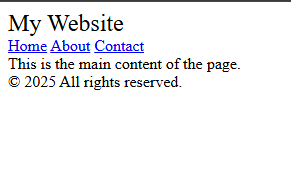
Explanation:
- The output looks okay visually.
- But this version uses only generic containers.
- No tag tells the browser what the content is meant for.
- Less helpful for search engines and screen readers.
Semantic HTML Example
(Uses <header>, <nav>, <main>, <footer> – with meaning)
<!DOCTYPE html>
<html>
<head>
<title>Semantic Example</title>
</head>
<body>
<header>
<h1>My Website</h1>
</header>

<nav>
<ahref="#">Home</a>
<ahref="#">About</a>
<ahref="#">Contact</a>
</nav>

<main>
<article>
<p>This is the main content of the page.</p>
</article>
</main>

<footer>
<p>© 2025 All rights reserved.</p>
</footer>
</body>
</html>
Output
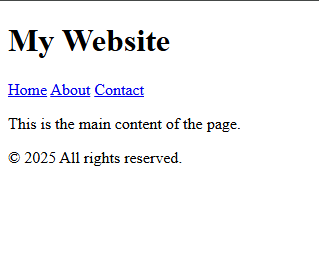
Explanation:
- The output is visually similar to the non-semantic version.
- But now, every section has a clear purpose defined in the HTML.
- Search engines understand what each section means.
- Screen readers can properly announce what each part is.
Conclusion:
| Feature | Non-Semantic Version | Semantic Version |
| Tags used | <div>, <span> | <header>, <nav>, <main> |
| Visual output | Same | Same |
| Meaning in code | No | Yes |
| SEO friendliness | Low | High |
| Accessibility support | Weak | Strong |
| Code readability | Confusing | Clear and professional |
Most Important Interview Questions
1. Why do developers prefer semantic tags over using div and span everywhere, even though all of them can be styled with CSS?
Semantic tags describe the purpose of content, while div and span do not. Even though all tags can be styled with CSS, semantic tags:
- Help search engines understand content better
- Improve accessibility for screen readers
- Make the HTML easier to read and maintain
For example,<article>tells the browser and developers that the content inside is a self-contained piece like a blog post, while<div>gives no such clue.
2. If the visual output of a semantic tag and a non-semantic tag is the same in a browser, what benefits does the semantic tag still offer?
Even if they look the same, semantic tags provide behind-the-scenes meaning to:
- Browsers
- Search engines
- Assistive technologies (like screen readers)
This results in better SEO rankings and more usable websites for people with disabilities. Semantic tags also make the codebase cleaner and self-explanatory for future developers.
3. Imagine you build a webpage only using div and span. What problems could this cause for:
- Search engines
- Blind users using screen readers
- Future developers maintaining the code?
Search engines may struggle to figure out which part of the page is main content, navigation, or footer, which can hurt your rankings.
Screen readers won’t know how to describe the structure of the page, making the site hard to use for blind users.
Future developers may find the code difficult to understand without reading through many lines or depending on class names.
4. How does using tags like <article>, <section>, <nav>, and <footer> help improve SEO without any extra tools?
Search engines like Google scan HTML structure to decide what the page is about. When semantic tags are used properly:
- They signal which parts are main content, navigation, or additional information
- Google can index pages more accurately
- They increase chances of being featured in rich results or snippets
So even without plugins or tools, using the right HTML tags improves search visibility.
5. If you have a block of content about a single blog post inside a webpage, which tag would you use and why: div or article?
<article> is the correct choice because it represents a self-contained, independent piece of content. A blog post is something that could be shared or reused on its own, and <article> is made for that purpose.
Using div instead wouldn’t give any clue to search engines or screen readers about what that content is meant to be.
6. Can a semantic tag like <main> or <section> be misused? Give an example and explain why it’s wrong.
Yes, semantic tags can be misused. For example:
<section>
<h1>Navigation Links</h1>
<ahref="#">Home</a>
</section>
This should have been written using <nav> because the content is navigation-related.
Misusing semantic tags confuses screen readers and search engines and defeats the purpose of writing meaningful HTML.
7. How do semantic tags improve accessibility for users who rely on screen readers?
Screen readers read HTML aloud to users. When semantic tags are used:
<nav>tells the user it’s a menu<header>signals the start of a new section<article>means an independent content block
These tags allow users to skip to important parts easily, making the web experience smoother and more inclusive.
8. Is it possible to build a complete website without using semantic tags? What would be the drawback?
Yes, it is technically possible to build a website using only div and span, but the drawbacks are:
- Poor SEO, because search engines can’t understand the content structure
- Bad accessibility, making the site difficult for screen reader users
- Messy code, which is hard to maintain or scale over time
So while the site might “work,” it will lack professional quality and user-friendliness.
9. Why is <div> often called a “generic container,” and what problems arise if it’s overused?
<div> is called a generic container because it holds content without describing its meaning or purpose.
Overusing it leads to:
- Code that’s hard to understand
- Over-dependence on class names and IDs for clarity
- Difficulty in managing large or complex layouts
Using the correct semantic tag avoids these issues by explaining content naturally through the tag itself.
10. In modern web development, is it acceptable to mix semantic and non-semantic tags? If yes, when?
Yes, it is acceptable and sometimes necessary to mix them.
Semantic tags should be used whenever meaning is clear, such as for headers, navigation, and articles.div and span are still useful for layout structures or small inline elements where no specific meaning applies.
The key is to use semantic tags for structure and meaning, and use div or span where nothing else fits.