
Internet Fundamentals
Today, the Internet is a part of almost everything we do. Whether you are watching videos, reading blogs, attending online classes, shopping online, or chatting with friends, you are using the Internet.
But have you ever wondered what the Internet actually is and how it works?
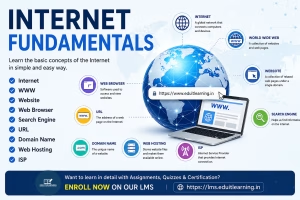
In this article, we will learn the basic concepts of the Internet, including the World Wide Web, websites, browsers, search engines, URLs, domain names, web hosting, and Internet Service Providers.
What is the Internet?
The Internet is a global network that connects millions of computers and devices around the world.
When devices are connected to the Internet, they can communicate with each other and exchange information. This information can be text, images, videos, audio files, documents, and much more.
Because it connects many different networks together, the Internet is often called the “Network of Networks.”
Some common uses of the Internet include:
- Sending and receiving emails
- Browsing websites
- Online learning
- Video calling
- Social media
- Online banking
- Shopping online
Today, the Internet has become one of the most important technologies in the world.
Computer Fundamental Free Course
A Brief History of the Internet
The Internet did not start as the huge system we use today.
In the 1960s, researchers developed a network called ARPANET that allowed computers to communicate with each other.
Later, communication rules known as TCP/IP were introduced, making it possible for different networks to connect together.
In 1989, Tim Berners-Lee introduced the World Wide Web (WWW), which made it easier for people to access information using websites and web browsers.
Since then, the Internet has continued to grow and now connects billions of devices worldwide.
What is the World Wide Web (WWW)?
The World Wide Web (WWW) is a collection of websites and web pages that can be accessed through the Internet.
Many people think the Internet and WWW are the same thing, but they are different.
- The Internet is the network that connects devices.
- The World Wide Web is a service that runs on the Internet and contains websites and web pages.
Whenever you open a website, you are using the World Wide Web.
What is a Website?
A website is a collection of related web pages available under a single domain name.
Websites are created to share information, provide services, sell products, offer online learning, and much more.
Examples of websites include:
- YouTube
- Wikipedia
- Amazon
- EDUITLEARNING
A website can contain multiple pages such as:
- Home Page
- About Us
- Contact Us
- Services
- Blog
- Courses
Every website is designed for a specific purpose.
What is a Web Browser?
A web browser is a software application used to access websites on the Internet.
When you enter a website address, the browser requests data from a server and displays it on your screen.
Popular web browsers include:
- Google Chrome
- Mozilla Firefox
- Microsoft Edge
- Safari
- Opera
Without a browser, accessing websites would be very difficult for users.
What is a Search Engine?
A search engine helps users find information on the Internet.
Instead of remembering website addresses, users can simply enter keywords and search for the information they need.
Popular search engines include:
- Bing
- Yahoo
- DuckDuckGo
For example, if you search for “Java Tutorial” on Google, it will show websites, videos, articles, and other resources related to Java.
Search engines make finding information quick and easy.
What is a URL?
URL stands for Uniform Resource Locator.
A URL is the complete address of a webpage or resource on the Internet.
Example:
https://eduitlearning.in/internet-fundamental
A URL tells the browser exactly where a webpage is located.
A typical URL contains:
- Protocol (https://)
- Domain Name (eduitlearning.in)
- Page Path (/internet-fundamentals)
Every webpage has its own unique URL.
What is a Domain Name?
A domain name is the unique name of a website.
Instead of remembering numerical IP addresses, people use domain names because they are easier to remember.
Examples:
- google.com
- youtube.com
- amazon.in
- eduitlearning.in
When you type a domain name into a browser, the Domain Name System (DNS) converts it into the corresponding IP address and loads the website.
Some common domain extensions are:
- .com
- .org
- .edu
- .gov
- .in
A domain name acts as the identity of a website on the Internet.
What is Web Hosting?
Every website contains files such as HTML pages, images, videos, and databases.
These files need a place to be stored so that users can access them online.
Web Hosting is the service that stores website files on special computers called servers.
When someone visits a website, the server sends the required files to the visitor’s browser.
Without web hosting, a website cannot be available on the Internet.
What is an ISP?
ISP stands for Internet Service Provider.
An ISP is a company that provides Internet access to users.
Examples of ISPs in India include:
- Jio Fiber
- Airtel Xstream Fiber
- BSNL
- ACT Fibernet
Whenever you connect your mobile phone, laptop, or computer to the Internet, you are using services provided by an ISP.
Without an ISP, devices cannot access the Internet.
Conclusion
The Internet has transformed the way people learn, communicate, and work. Understanding concepts such as websites, browsers, search engines, URLs, domain names, web hosting, and ISPs helps build a strong foundation in computer fundamentals.
Important Questions – Internet Fundamentals
1. What is the Internet?
The Internet is a worldwide network that connects millions of computers and devices, allowing them to communicate and share information.
2. Why is the Internet called a “Network of Networks”?
The Internet is called a Network of Networks because it connects many smaller networks from different organizations, countries, and service providers into one large global network.
3. What is the difference between the Internet and the World Wide Web (WWW)?
The Internet is the global network that connects devices, while the World Wide Web (WWW) is a collection of websites and web pages that run on the Internet.
4. What is a Website?
A website is a collection of related web pages available under a single domain name and accessible through the Internet.
5. What is a Web Browser? Name some popular browsers.
A web browser is software used to access and view websites on the Internet.
Examples:
- Google Chrome
- Mozilla Firefox
- Microsoft Edge
- Safari
- Opera
6. What is a Search Engine?
A search engine is a tool that helps users find information on the Internet by searching keywords.
Examples:
- Bing
- Yahoo
- DuckDuckGo
7. What is a URL?
URL (Uniform Resource Locator) is the complete address of a webpage or resource available on the Internet.
Example:
https://www.eduitlearning.in
8. What is a Domain Name?
A domain name is the unique name of a website that users type into a browser to access the website.
Example:
google.com, youtube.com, eduitlearning.in
9. What is Web Hosting?
Web hosting is a service that stores website files on servers and makes them accessible on the Internet.
10. What is an ISP? Give Examples.
An ISP (Internet Service Provider) is a company that provides Internet access to users.
Examples:
- Jio Fiber
- Airtel Xstream Fiber
- BSNL
- ACT Fibernet