
Central Processing Unit (CPU)
A Central Processing Unit (CPU) is one of the most important components of a computer. It is responsible for executing instructions, processing data, performing calculations, and controlling many operations of the computer.
The CPU is also commonly called a processor. Whenever we open an application, perform a calculation, type something using the keyboard, or execute a program, the CPU processes the instructions required to perform that task.
Because the CPU performs the main processing operations of a computer, it is often called the “brain of the computer.”
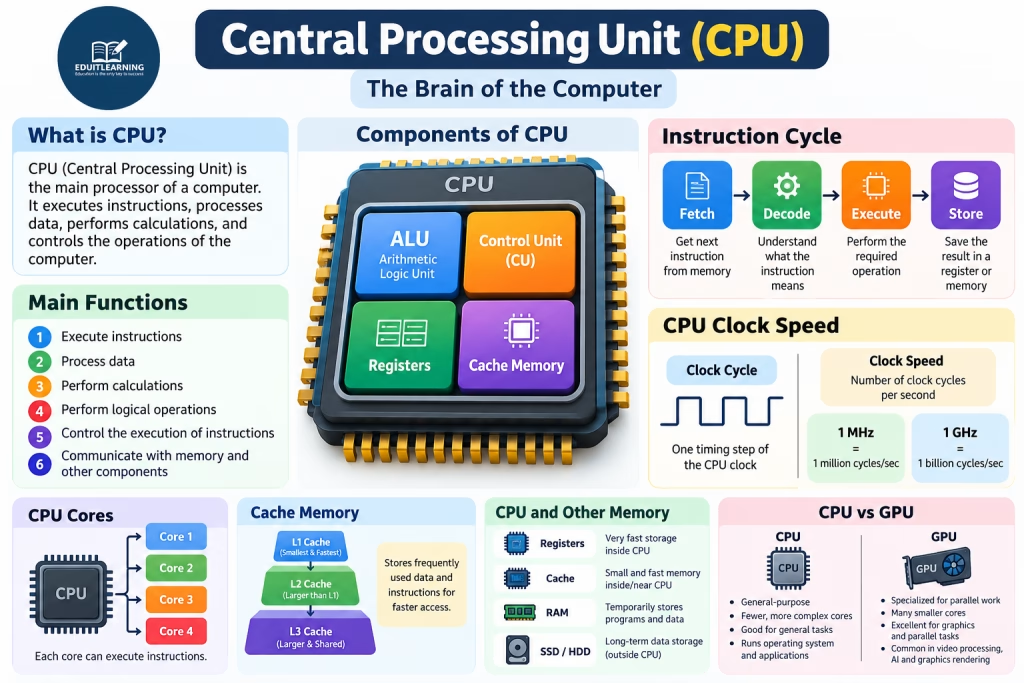
What is a Central Processing Unit (CPU)?
CPU stands for Central Processing Unit.
The CPU is the main processor of a computer system. It reads and executes instructions provided by programs and performs the required operations on data.
For example, when we use a calculator application and calculate:
25 + 15 = 40
The CPU processes the instructions and data required to perform this calculation and produces the result.
The CPU also communicates with other components such as RAM, storage devices, input devices, output devices, and other hardware components.
Therefore, the CPU plays a central role in the overall operation of a computer.
Functions of CPU
The CPU performs several important functions in a computer.
Some major functions of the CPU are:
- Executing instructions
- Processing data
- Performing arithmetic calculations
- Performing logical operations
- Controlling the execution of instructions
- Communicating with memory
- Coordinating operations between different computer components
For example, when we open a text editor, the CPU processes the instructions required to start the application and works with memory and other hardware to keep the application running.
Components of CPU
A modern CPU contains several important components that work together to execute instructions efficiently.
The major components include:
- Arithmetic Logic Unit (ALU)
- Control Unit (CU)
- Registers
- Cache Memory
In addition, the CPU works closely with RAM and secondary storage such as SSDs and HDDs. However, RAM, SSD, and HDD are separate components of the computer system and should not be considered components physically inside the CPU.
1. Arithmetic Logic Unit (ALU)
ALU stands for Arithmetic Logic Unit.
The ALU is a component of the CPU that performs arithmetic and logical operations.
Arithmetic Operations
Arithmetic operations are mathematical operations performed on data.
The ALU can perform operations such as:
- Addition
- Subtraction
- Multiplication
- Division
For example:
10 + 5 = 15
20 - 8 = 12
6 × 4 = 24
20 ÷ 5 = 4
Therefore, whenever a program requires a mathematical calculation, the CPU uses appropriate processing components, including the ALU, to perform the operation.
Logical Operations
The ALU also performs logical and comparison operations.
For example:
10 > 5
20 == 20
15 < 30
These operations help the computer compare values and make decisions during program execution.
Therefore, the ALU is mainly responsible for performing arithmetic calculations and logical operations.
2. Control Unit (CU)
CU stands for Control Unit.
The Control Unit controls and coordinates the execution of instructions inside the CPU.
It manages the flow of instructions and sends control signals to different components so that the required operation can be performed.
The instruction execution process is commonly explained using four basic stages:
- Fetch
- Decode
- Execute
- Store
Let’s understand each stage.
Fetch
During the Fetch stage, the CPU obtains the next instruction from memory.
The Program Counter (PC) keeps track of the address of the next instruction that needs to be fetched.
Therefore, the CPU knows where to obtain the next instruction.
Decode
After fetching the instruction, the CPU needs to understand what the instruction means.
This stage is called Decode.
During decoding, the CPU interprets the instruction and determines:
- What operation needs to be performed
- Which data is required
- Which CPU resources are needed
Execute
After decoding the instruction, the CPU performs the required operation.
Depending on the instruction, the operation may involve:
- ALU
- Registers
- Memory
- Other CPU components
For example, if the instruction requires an addition operation, the CPU uses the appropriate processing resources to perform the calculation.
Store
After an operation is completed, the result may need to be stored.
The result can be temporarily kept in a CPU register or written to memory, depending on the instruction and the requirements of the program.
Therefore, the basic instruction cycle can be represented as:
Fetch → Decode → Execute → Store3. Registers
Registers are very small and extremely fast storage locations inside the CPU.
They temporarily hold data, instructions, memory addresses, or intermediate results that the CPU is currently working with.
Because registers are located inside the CPU and provide very fast access, they are important for efficient instruction execution.
For example, while performing a calculation, the CPU may temporarily keep values or intermediate results in registers.
Some commonly discussed CPU registers include:
- Program Counter (PC)
- Instruction Register (IR)
- Accumulator
- Memory Address Register (MAR)
- Memory Data Register (MDR)
Different processors have different register designs and architectures.
4. Cache Memory
Cache memory is a small and very fast memory located inside or very close to the CPU.
It stores frequently used data and instructions so that the CPU can access them faster than accessing them from main memory in many situations.
Suppose you are using a program and the CPU repeatedly needs the same data.
Instead of getting that data from RAM every time, frequently needed data can be kept in the CPU cache.
For example:
CPU needs data
      ↓
Is the data available in Cache?
      ↓
Yes → Get it quickly
      ↓
No → Get it from RAM
Therefore, cache can reduce the time the CPU spends waiting for frequently needed data.
Cache = Small + Very Fast + Frequently Used Data
Cache memory is generally:
- Faster than RAM
- Smaller than RAM
- More expensive per unit of storage
- Used to reduce memory access delays
Common cache levels include:
L1 Cache
L1 cache is generally the smallest and fastest CPU cache.
L2 Cache
L2 cache is usually larger than L1 cache but generally slower.
L3 Cache
L3 cache is generally larger than L1 and L2 cache and may be shared between multiple CPU cores.
Therefore, cache memory helps reduce the time the CPU needs to access frequently required data and instructions.
CPU and Computer Memory
The CPU works closely with different types of memory and storage.
However, it is important to understand the difference between CPU components and computer memory/storage.
| Memory/Storage | Main Purpose |
|---|---|
| Registers | Store data and instructions currently being processed by the CPU |
| Cache | Store frequently used data and instructions for faster access |
| RAM | Temporarily stores programs and data currently being used |
| SSD/HDD | Stores data for long-term use |
Therefore, RAM, SSD, and HDD are not components inside the CPU. They are separate components of the computer system that communicate with the CPU.
How Does a CPU Work?
The CPU executes program instructions through an instruction cycle.
The basic process can be represented as:
Fetch → Decode → Execute → StoreLet’s understand this with a simple example.
Suppose a program needs to calculate:
10 + 20The CPU first fetches the required instruction.
Next, it decodes the instruction to understand that an addition operation needs to be performed.
Then, the CPU executes the operation using the appropriate CPU components.
Finally, the result is stored in a register or memory as required.
The result is:
10 + 20 = 30This instruction processing happens extremely quickly, allowing computers to run applications and perform many operations.
Clock Speed of CPU
CPU clock speed, also called clock rate, indicates how many clock cycles a CPU can perform in one second.
CPU clock speed is commonly measured in:
- Megahertz (MHz)
- Gigahertz (GHz)
1 MHz
1 MHz = 1 million cycles per second1 GHz
1 GHz = 1 billion cycles per secondFor example, a CPU with a clock speed of 3 GHz has a clock rate of approximately:
3 billion cycles per secondHowever, 3 GHz does not mean that the CPU executes exactly 3 billion instructions per second.
The number of instructions a CPU can complete depends on several factors, including:
- CPU architecture
- Instruction type
- Number of CPU cores
- Cache
- Pipeline design
- Memory performance
- Software workload
Therefore, clock speed is an important specification, but it should not be used alone to determine the overall performance of a CPU.
CPU Cores
A CPU core is an individual processing unit inside a CPU that can execute instructions.
A CPU can have one or multiple cores.
For example:
Single-Core CPU
       ↓
     1 Core

Dual-Core CPU
       ↓
   2 Cores

Quad-Core CPU
       ↓
   4 Cores

Octa-Core CPU
       ↓
   8 Cores
Suppose a computer has a quad-core CPU.
It has four processing cores:
CPU
├── Core 1
├── Core 2
├── Core 3
└── Core 4
Each core can execute instructions.
Therefore, multiple cores allow a CPU to work on multiple instruction streams at the same time when the operating system and software can use them effectively.
Example
Suppose you are:
- Playing music
- Downloading a file
- Using a browser
- Editing a document
The operating system can distribute different work across available CPU cores.
However, this does not mean that a quad-core CPU is automatically four times faster than a single-core CPU. Performance depends on the software, workload, CPU architecture, and other factors.
CPU vs GPU
CPU and GPU are both processors, but they are designed for different types of workloads.
| CPU | GPU |
|---|---|
| General-purpose processor | Specialized processor for highly parallel workloads |
| Usually has fewer, more complex cores | Usually has many smaller processing units |
| Good for general computing tasks | Excellent for graphics and parallel computations |
| Runs operating systems and general applications | Commonly handles graphics and other parallel workloads |
| Designed for flexible instruction processing | Designed to perform many similar operations in parallel |
For example, a CPU is responsible for general application processing, while a GPU is commonly used for graphics rendering, video processing, machine learning, and other highly parallel workloads.
CPU and Input/Output Devices
The CPU also works with input and output devices.
For example, when we press a key on the keyboard, the computer receives the input and processes the corresponding instructions.
Similarly, when we use a mouse, the system receives information about mouse actions and processes it.
The CPU then works with the operating system, memory, and other hardware to perform the required operation.
Therefore, the CPU plays an important role in coordinating the overall processing of computer operations.
CPU Performance
CPU performance does not depend on only one specification.
Several factors can affect CPU performance, including:
1. Clock Speed
A higher clock speed can allow a processor to perform more clock cycles per second. However, clock speed alone cannot determine overall performance.
2. Number of Cores
Multiple cores allow a CPU to work on multiple instruction streams simultaneously when software supports parallel execution.
3. Cache
Larger or better-designed caches can help reduce delays when frequently used data and instructions are accessed.
4. CPU Architecture
Different CPU architectures can perform different amounts of work per clock cycle.
5. Memory Performance
CPU performance can also be affected by how quickly required data can be supplied from memory.
Therefore, CPU performance should be evaluated using multiple specifications rather than clock speed alone.
Why is CPU Called the Brain of the Computer?
The CPU is often called the brain of the computer because it executes instructions, processes data, performs calculations, and coordinates many computer operations.
For example, when we:
- Open an application
- Perform a calculation
- Type text
- Browse a website
- Play a game
- Edit a document
the CPU processes the instructions required by the operating system and applications.
However, the CPU does not work alone. It works together with RAM, storage, input devices, output devices, GPU, and other components.
CPU Example
Suppose we use a calculator application and enter:
25 + 50The basic processing can be understood as follows:
Step 1: Input
We enter 25 + 50 using an input device.
Step 2: Instruction Processing
The application provides instructions that the CPU needs to process.
Step 3: Fetch
The CPU fetches the required instructions.
Step 4: Decode
The CPU decodes the instructions to understand the required operation.
Step 5: Execute
The CPU performs the addition operation.
Step 6: Result
The result is:
25 + 50 = 75The result is then made available to the application and displayed to the user.
Frequently Asked Questions About CPU
1. What is CPU?
CPU stands for Central Processing Unit. It is the main processor of a computer that executes instructions, processes data, performs calculations, and controls many computer operations.
2. Why is CPU called the brain of the computer?
CPU is called the brain of the computer because it executes instructions, processes data, performs calculations, and coordinates many operations of the computer.
3. What are the main components of a CPU?
Important components of a modern CPU include:
- ALU
- Control Unit
- Registers
- Cache Memory
4. What is the function of ALU?
ALU stands for Arithmetic Logic Unit. It performs arithmetic and logical operations such as addition, subtraction, multiplication, division, and comparisons.
5. What is the function of the Control Unit?
The Control Unit coordinates the execution of instructions and controls the flow of operations between CPU components and other parts of the computer.
6. What are CPU registers?
Registers are small and very fast storage locations inside the CPU. They temporarily hold data, instructions, addresses, and intermediate results.
7. What is CPU cache?
CPU cache is a small and very fast memory located inside or close to the CPU. It stores frequently used data and instructions to reduce access time.
8. What is CPU clock speed?
CPU clock speed is the number of clock cycles a CPU can perform in one second. It is commonly measured in MHz or GHz.
9. Does 3 GHz mean 3 billion instructions per second?
No. 3 GHz means approximately 3 billion clock cycles per second. The number of instructions completed per second depends on CPU architecture, instruction type, cores, cache, and other factors.
10. What is a CPU core?
A CPU core is an individual processing unit within a CPU that can execute instructions.
11. What is the difference between CPU and GPU?
A CPU is a general-purpose processor designed for a wide range of tasks, while a GPU is designed for highly parallel workloads such as graphics processing and other parallel computations.
Summary
The Central Processing Unit (CPU) is the main processor of a computer. It executes instructions, processes data, performs calculations, and coordinates many computer operations.
The important components of a modern CPU include the Arithmetic Logic Unit (ALU), Control Unit (CU), Registers, and Cache Memory.
The CPU generally processes instructions through the basic stages:
Fetch → Decode → Execute → StoreThe ALU performs arithmetic and logical operations, while the Control Unit coordinates instruction execution. Registers provide very fast temporary storage inside the CPU, and cache memory helps the CPU access frequently used data and instructions quickly.
CPU clock speed is measured in MHz or GHz and represents the number of clock cycles per second. However, CPU performance depends on several factors, including architecture, cores, cache, memory performance, and workload.