
Connectivity of Keyboard and Mouse
In this tutorial, we will discuss about how to connect keyboard or mouse to the computer. Keyboard/Mouse connectivity is important because without connect the input devices to computer, we cannot communicate with computer and cannot give instructions to computer.
Let’s discuss how many ways to connect keyboard or mouse to the computer.
How to connect keyboard or mouse to the computer?
There are two way to connect keyboard or mouse to the computer: –
- Wired connectivity
- Wireless connectivity
1.) Wired Connection
In this connection, we connect keyboard or mouse with the help of wire means we have to connect physical wire to the computer.
There are two types of wired connection: –
- USB (Universal Serial Bus) : – It is the most common connectivity now a days. Nowadays, almost all devices can be connected through USB. It is rectangular shape and there are 4 pins in it. USB is become the standard for connecting peripherals.

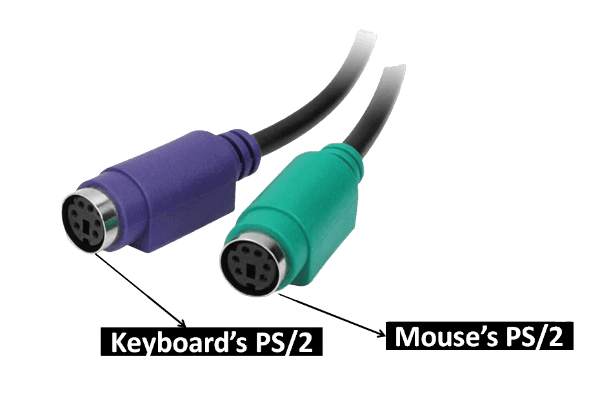
- PS/2 (Personal System version-2): – It was used mostly in early days. It is circular in shape and there are 6 pins in it. Nowadays, It is not being used It is only available in the Desktop not in laptop. Some modern keyboards and mouse still use PS/2 specially for specialized or gaming peripherals. Keyboard PS/2 is Purple in color and the Mouse PS/2 is Green on Color
2.) Wireless Connection
In this connectivity, we don’t need to have a physical wire. In this, we connect keyboard or mouse through microwave or radio wave.
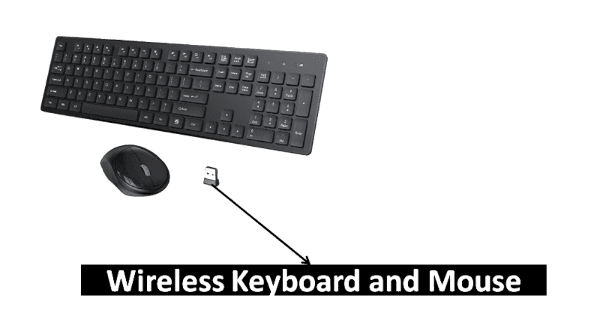
Generally there are three types of wireless connectivity: –
- Wifi (Wireless Fidelity): – This is a wireless technology that is used to connect keyboard or mouse. It uses radio wave to transmit data. It operates in the 2.4 and 5 GHz frequency band.
- Bluetooth: – Bluetooth is also a wireless technology that is used to connect keyboard and mouse in short range typically up to about 10 meters. Its range is shorter than wifi. It uses radio wave to transmit data. It operates in a 2.4 GHz frequency band.
- IR (Infrared): – It uses infrared light waves to transmit data between devices in short range. It is simple and low cost technology. But it is not a commonly used connectivity. It was used in past for certain applications. It is replaced by Bluetooth.