
HTML SEO Elements
Creating a website or writing a blog is easy. The real challenge is helping people find your content on search engines like Google.
Every day, millions of users search for information online. Search engines analyze webpages and decide which pages should appear in search results.
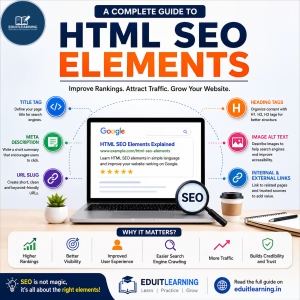
To understand a webpage properly, search engines rely on several HTML SEO Elements. These elements provide important information about the content and help improve visibility in search results.
In this guide, you will learn the most important HTML SEO Elements.
What are HTML SEO Elements?
HTML SEO Elements are special HTML tags and webpage components that help search engines understand the content of a webpage.
They provide information such as:
- What the page is about
- Which keywords are important
- How content is organized
- What images represent
- How pages are connected
Proper use of these elements helps improve both user experience and search engine optimization.
Computer Fundamental Free Course – Enroll Now
1. Title Tag
The Title Tag is one of the most important SEO elements.
When your webpage appears in Google search results, the clickable blue heading is usually the Title Tag.
It also appears in browser tabs and bookmarks.
Example:
<title>HTML SEO Elements for Beginners</title>
Why is the Title Tag Important?
- Helps search engines understand the page topic
- Improves click-through rate
- Appears in search results
- Helps users identify the page
Characteristics of a Good Title Tag
- Clear and descriptive
- Contains the focus keyword
- Easy to read
- Attractive to users
- Around 50–60 characters
Good Example
HTML SEO Elements Explained for Beginners
Bad Example
Home Page
The first example clearly explains the topic while the second provides no useful information.
2. Meta Description
A Meta Description is a short summary of a webpage.
It usually appears below the Title Tag in search results.
Example:
<meta name=”description” content=”Learn HTML SEO Elements including title tags, meta descriptions, URL slugs, heading tags, and image optimization.”>
Why is Meta Description Important?
- Gives users a preview of the page
- Improves click-through rate
- Helps search engines understand content
- Encourages users to visit the page
Best Practices
- Keep it between 150–160 characters
- Include the focus keyword naturally
- Clearly explain the content
- Make it attractive and informative
Good Example
Learn HTML SEO Elements including Title Tags, Meta Descriptions, URL Slugs, Heading Tags, and Image Optimization.
Bad Example
Welcome to our website.
3. URL Slug
The URL Slug is the last part of a webpage URL.
Example:
https://example.com/html-seo-elements
The URL Slug is:
html-seo-elements
Why is URL Slug Important?
A good URL helps both users and search engines understand what the page is about.
Characteristics of a Good URL
- Short
- Readable
- Descriptive
- Contains the focus keyword
- Uses hyphens between words
Good Example
/html-seo-elements
Bad Example
/post123?id=5678
The first URL clearly describes the page topic while the second does not.
4. Focus Keyphrase
A Focus Keyphrase is the main search term you want your page to rank for.
For this article, the Focus Keyphrase is:
HTML SEO Elements
When users search for this phrase, search engines can identify the page as relevant to that topic.
Where Should the Focus Keyphrase Appear?
- Title Tag
- Meta Description
- URL Slug
- H1 Heading
- Content
- Image Alt Text
Example
Focus Keyphrase:
HTML SEO Elements
Title:
HTML SEO Elements: Complete Beginner’s Guide
The keyphrase appears naturally and clearly.
Avoid Keyword Stuffing
Bad Example:
HTML SEO Elements is the best HTML SEO Elements guide because HTML SEO Elements help you learn HTML SEO Elements.
This looks unnatural and provides a poor reading experience.
5. Heading Tags (H1 to H6)
Heading Tags organize content into sections and make articles easier to read.
HTML provides six heading levels:
<h1>Main Heading</h1>
<h2>Section Heading</h2>
<h3>Subsection Heading</h3>
<h4>Sub Heading</h4>
<h5>Small Heading</h5>
<h6>Smallest Heading</h6>
Why are Heading Tags Important?
- Improve readability
- Organize content
- Help search engines understand content structure
- Improve user experience
Example Structure
<h1>HTML SEO Elements</h1>
<h2>Title Tag</h2>
<h2>Meta Description</h2>
<h2>URL Slug</h2>
<h3>Best Practices</h3>
Best Practice
Use one H1 tag per page and organize the rest of the content using H2 and H3 headings.
6. Image Alt Text
Search engines cannot fully understand images.
Alt Text provides a description of an image.
Example:
<img src=”seo-elements.jpg” alt=”HTML SEO Elements Infographic”>
Why is Alt Text Important?
- Improves image SEO
- Supports accessibility
- Helps search engines understand images
- Displays information if an image fails to load
Good Example
alt=”HTML SEO Elements Infographic”
Bad Example
alt=”image1″
Good Alt Text clearly describes the image.
7. Internal Links
Internal Links connect one page of a website to another page on the same website.
Example
Suppose a programming website contains these articles:
- Java Basics
- Java Variables
- Java Operators
- Java Loops
While reading the Java Loops article, users may find links to Java Variables and Java Operators.
Since all pages belong to the same website, these are Internal Links.
Benefits of Internal Links
- Improve navigation
- Help users discover related content
- Help search engines crawl pages
- Increase time spent on the website
Good Anchor Text
<a href=”/java-variables”>
Learn Java Variables
</a>
Bad Anchor Text
<a href=”/java-variables”>
Click Here
</a>
Good Anchor Text clearly describes the destination page.
8. External Links
External Links point to another website.
Example
A blog about HTML may link to:
for official HTML documentation.
Or a Python article may link to:
for official Python documentation.
Since these links lead to another website, they are External Links.
Benefits of External Links
- Provide additional information
- Increase content credibility
- Support claims with trusted sources
- Help users learn more
Always link to reliable and trustworthy websites.
Common SEO Mistakes
Many beginners make mistakes that can affect SEO performance.
Common mistakes include:
- Keyword stuffing
- Missing Title Tags
- Missing Meta Descriptions
- Poor URL structure
- Multiple H1 tags
- Missing Alt Text
- Broken links
- Duplicate content
Avoiding these mistakes can significantly improve website quality.
SEO Checklist Before Publishing a Blog
Before publishing any blog, verify the following:
✔ Title Tag added
✔ Meta Description written
✔ Focus Keyphrase selected
✔ SEO-friendly URL created
✔ One H1 heading used
✔ Proper H2 and H3 structure
✔ Images optimized with Alt Text
✔ Internal Links added
✔ External Links verified
✔ Content proofread
Following this checklist helps ensure your content is optimized for both users and search engines.
HTML SEO Elements form the foundation of on-page SEO. They help search engines understand your content and make it easier for users to navigate your website.
By properly using Title Tags, Meta Descriptions, URL Slugs, Focus Keyphrases, Heading Tags, Image Alt Text, Internal Links, and External Links, you can improve search visibility and create a better user experience.
SEO is not about shortcuts or tricks. It is about creating useful, organized, and valuable content that helps users find the information they need.