
JavaScript Non-Primitive Datatypes
When you start learning JavaScript, one of the biggest shifts happens when you move from primitive data types to non-primitive (reference) data types.
Till now, you were mostly working with basic values. But from here, JavaScript allows you to work with more complex and structured data.
In this lesson, you will understand non-primitive data types in a way that actually makes sense, not just definitions.
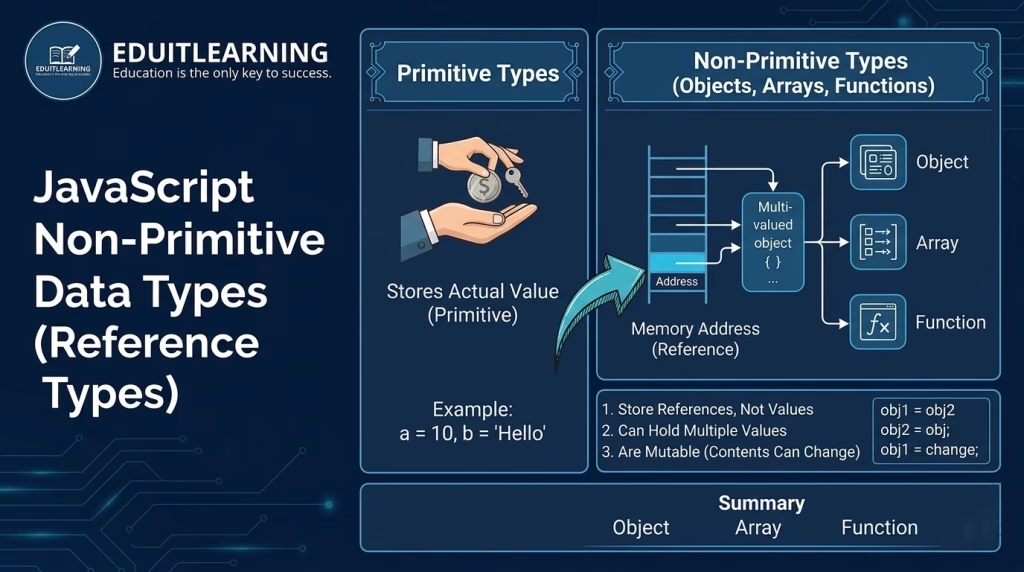
What Are Non-Primitive Data Types in JavaScript?
Non-primitive data types are those data types that do not store actual values directly.
It can store multiple values in single variable.
Instead:
- They store a reference (address) to where the data is located in memory
- The actual data is stored somewhere else in memory
- Variables point to that location
- Primitive → stores value
- Non-Primitive → stores reference to value
In simple words:
- Primitive → You have money in your pocket
- Non-Primitive → You have a bank account number (actual money is stored in the bank)
Types of Non-Primitive Data Types in JavaScript
JavaScript mainly provides these non-primitive types:
- Object
- Array
- Function
All of these are technically objects in JavaScript, but they behave differently.
1. Object in JavaScript
An object is a collection of key-value pairs.
It is used when you want to store multiple related values together.
Example
let student = {
    name: "Ritik",
    age: 22,
    course: "Java"
};
Here:
- name, age, course → keys
- “Ritik”, 22, “Java” → values
Why Objects Are Useful
Objects help you represent real-world entities.
For example:
- Student details
- User profile
- Product information
Instead of creating multiple variables, you group everything into one structure.
Accessing Object Data
console.log(student.name);
console.log(student["age"]);
Both methods are valid.
2. Array in JavaScript
An array is used to store multiple values in a single variable.
Example
let marks = [85, 90, 78, 92];Here:
- Data is stored in order
- Each value has an index (starting from 0)
Accessing Array Elements
console.log(marks[0]); // 85
console.log(marks[2]); // 78
Why Arrays Are Important
Arrays are used when:
- You have a list of items
- Data is ordered
- Same type or mixed type values
Example:
- Student marks
- Product list
- User comments
3. Function in JavaScript
In JavaScript, functions are also treated as objects.
That means:
- They can be stored in variables
- Passed as arguments
- Returned from other functions
Example
function greet() {
    console.log("Hello");
}
Or:
let greet = function() {
    console.log("Hello");
};
Why Functions Are Non-Primitive
Because functions:
- Are stored in memory separately
- Variables store their reference
- Can be reused and passed around
Reference Behavior
This is the most important concept in non-primitive data types.
Example
let obj1 = { name: "Ritik" };
let obj2 = obj1;
obj2.name = "Aman";
console.log(obj1.name); // Aman
What Happened Here?
- obj1 stores the object reference
- obj2 copies that reference (not the actual object)
- Both variables point to the same memory location
So when you change obj2, it also affects obj1
Difference Between Primitive and Non-Primitive
| Feature | Primitive | Non-Primitive |
| Storage | Direct value | Reference (address) |
| Copy behavior | Value copy | Reference copy |
| Mutability | Immutable | Mutable |
| Examples | number, string | object, array |
Mutability in Non-Primitive Types
Non-primitive types are mutable, which means:
You can change their content after creation.
Example
let user = { name: "Ritik" };
user.name = "Aman"; // Changed value
The object is modified without creating a new one.
Important:
- Non-primitive data types store references, not actual values
- Objects, arrays, and functions are all reference types
- Changes in one variable can affect another if they share the same reference
- These data types are mutable
Best Practices
- Use objects for structured data
- Use arrays for ordered data
- Be careful while copying objects (use cloning if needed)
- Avoid unintended side effects due to reference sharing