
JavaScript Tutorial
If you want to become a Web Developer, Full Stack Developer, or Software Engineer, then JavaScript is one of the most important programming languages you must learn.
Whenever students join my web development classes, one question always comes up:
“Sir, after HTML and CSS, what should I learn next?”
My answer is always the same:
JavaScript.
Because HTML gives structure to a webpage, CSS makes it beautiful, but JavaScript makes it interactive and intelligent.
Think about websites like YouTube, Instagram, Facebook, Amazon, Netflix, or WhatsApp Web.
When you:
- Click a button
- Submit a form
- Open a menu
- Watch a notification appear instantly
- Add products to a cart
- Like a post
JavaScript is working behind the scenes.
Without JavaScript, websites would only display information. They would not be able to respond to user actions.
So before learning advanced technologies like React, Node.js, Express.js, or MongoDB, it is very important to build a strong JavaScript foundation.
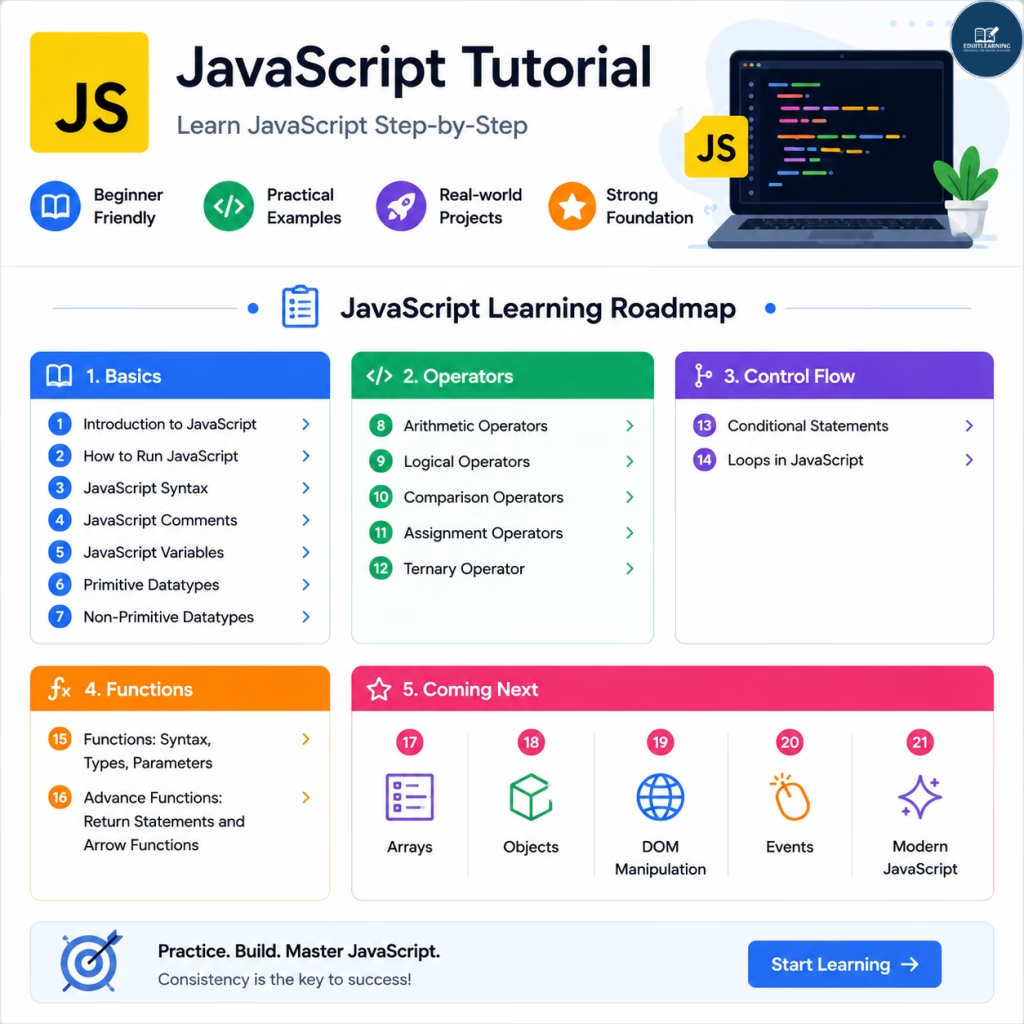
In this complete JavaScript tutorial, I will guide you step-by-step through all the important concepts that every beginner should learn.
JavaScript Basics
- Introduction to JavaScript
- How to Run JavaScript
- JavaScript Syntax
- JavaScript Comments
- JavaScript Variables
- JavaScript Primitive Datatypes
- JavaScript Non-Primitive Datatypes
JavaScript Operators
- JavaScript Arithmetic Operators
- JavaScript Logical Operators
- JavaScript Comparison Operators
- JavaScript Assignment Operators
- JavaScript Ternary Operator
JavaScript Control Flow
JavaScript Functions
- JavaScript Functions: Syntax, Types, Parameters
- JavaScript Advance Functions: Return Statements and Arrow Functions
JavaScript String
- String in JavaScript
- Search String Methods
- String Extraction Methods
- String Modification Methods
- String Character Methods
- String Case Conversion Methods
- String Conversion Methods
Advance JavaScript
- JavaScript Arrays
- JavaScript Objects
- DOM Manipulation
- Events in JavaScript
- Modern JavaScript Concepts
- Asynchronous JavaScript
- fetch API
- Module JS
What is JavaScript?
JavaScript is a programming language used to make websites interactive and dynamic.
For example, whenever you click a button or submit a form, JavaScript is often responsible for handling that action.
Because of this, JavaScript has become an essential part of modern web development.
For example:
- Form validation
- Image sliders
- Dropdown menus
- Login systems
- Search functionality
- Dynamic content updates
- Interactive web applications
In simple words:
HTML: Creates the structure.
CSS: Adds design and styling.
JavaScript: Adds functionality and interactivity.
Let’s understand this with a simple real-life example.
Imagine you are building a house.
- HTML is the walls, doors, and windows.
- CSS is the paint and decoration.
- JavaScript is the electricity, fans, lights, and automation.
Without JavaScript, the house may look beautiful, but many important functions would not work.
Why Learn JavaScript?
Many students ask:
“Sir, why is JavaScript so popular?”
The answer is simple.
JavaScript is popular because it can be used almost everywhere.
Additionally, it is beginner-friendly and easy to start with.
As a result, many students choose JavaScript as their first programming language.
With JavaScript, developers can create:
- Websites
- Web Applications
- Mobile Applications
- Backend APIs
- Desktop Applications
- Browser Extensions
- Games
As a result, one programming language can open multiple career opportunities.
Popular career paths include:
- Frontend Developer
- Backend Developer
- Full Stack Developer
- Software Engineer
- Web Developer
JavaScript is also one of the most demanded skills in the software industry.
Prerequisites Before Learning JavaScript
Before starting JavaScript, you should have basic knowledge of:
- HTML
- CSS
- Web Browsers
- Computer Fundamentals
You do not need any prior programming experience.
JavaScript Complete Learning Roadmap
One mistake many beginners make is directly jumping into React or Node.js.
Don’t do that.
First, understand JavaScript properly.
Follow this roadmap step-by-step.
1. Introduction to JavaScript
This is where your JavaScript journey begins.
In this topic, you will learn:
- What JavaScript is
- History of JavaScript
- Features of JavaScript
- Uses of JavaScript
- Why JavaScript is important
2. How to Run JavaScript
Before writing code, you must know where JavaScript runs.
You will learn:
- Browser Console
- Internal JavaScript
- External JavaScript
- Node.js Environment
Once you understand this topic, you will be able to execute JavaScript programs.
3. JavaScript Syntax
Every language has rules.
JavaScript also follows specific syntax rules.
You will learn:
- Statements
- Semicolons
- Case Sensitivity
- Writing Proper JavaScript Code
Example:
console.log(“Hello World”);
Understanding syntax is important because even small mistakes can generate errors.
4. JavaScript Comments
Comments help explain code.
When working on large projects, comments make code easier to understand and maintain.
You will learn:
- Single-line Comments
- Multi-line Comments
- Best Practices for Comments
5. JavaScript Variables
Variables are containers used to store data.
For example:
- Student Name
- Age
- Email Address
- Marks
All these values can be stored inside variables.
Topics covered:
- var
- let
- const
- Scope
- Redeclaration
- Reassignment
- Best Practices
Variables are one of the most important concepts in JavaScript.
6. JavaScript Data Types
After learning variables, the next question is:
“What kind of data can a variable store?”
The answer is Data Types.
Primitive Data Types
- String
- Number
- Boolean
- Undefined
- Null
- Symbol
- BigInt
Non-Primitive Data Types
- Object
- Array
- Function
Understanding data types helps you write better code and avoid bugs.
7. JavaScript Operators
Operators perform calculations and comparisons.
Topics covered:
Arithmetic Operators
- Addition
- Subtraction
- Multiplication
- Division
- Modulus
Assignment Operators
- =
- +=
- -=
- *=
Comparison Operators
- ==
- ===
- !=
- <
Logical Operators
- &&
- ||
- !
Ternary Operator
A shorter way to write conditions.
Operators are used in almost every JavaScript program.
8. Conditional Statements
Programs often need to make decisions.
For example:
- Is the user logged in?
- Is the age greater than 18?
- Is the password correct?
Conditional statements help us handle such situations.
Topics covered:
- if Statement
- if…else
- else if
- Nested if
- switch Statement
This topic helps you create decision-making logic inside applications.
9. Loops in JavaScript
Let’s say printing numbers from 1 to 100.
Writing 100 console.log() statements would be inefficient.
Loops solve this problem.
Topics covered:
- for Loop
- while Loop
- do…while Loop
- Nested Loops
- break Statement
- continue Statement
Loops are heavily used in real-world applications.
10. JavaScript Functions
Functions help us organize and reuse code.
Instead of writing the same code multiple times, we write it once and call it whenever needed.
Topics covered:
- Function Declaration
- Function Expression
- Parameters
- Arguments
- Reusable Code
Functions are one of the building blocks of programming.
11. Return Statements
A function can send data back using a return statement.
Example:
function add(a, b){
return a + b;
}
Topics covered:
- return Keyword
- Returning Values
- Returning Multiple Results
- Function Output
Return statements are essential for building real applications.
12. Arrow Functions
Arrow Functions were introduced in ES6.
They provide a shorter and cleaner syntax for writing functions.
Example:
const greet = () => {
console.log(“Hello”);
};
Topics covered:
- Arrow Function Syntax
- Single-Line Arrow Functions
- Parameters
- Implicit Return
- Differences from Regular Functions
Arrow Functions are widely used in modern JavaScript frameworks.
13. Arrays in JavaScript
Arrays allow us to store multiple values in a single variable.
Example:
let fruits = [“Apple”, “Mango”, “Banana”];
Topics covered:
- Creating Arrays
- Accessing Elements
- Updating Elements
- Array Methods
- Looping Through Arrays
Arrays are used in almost every application.
14. Objects in JavaScript
Objects store data in key-value pairs.
Example:
let student = {
name: “Ritik”,
age: 22
};
Topics covered:
- Object Properties
- Object Methods
- Accessing Data
- Updating Objects
- Nested Objects
Objects are the foundation of modern JavaScript development.
15. DOM Manipulation
DOM stands for Document Object Model.
The DOM allows JavaScript to interact with HTML elements.
Using DOM Manipulation, we can:
- Change Text
- Change Styles
- Add Elements
- Remove Elements
- Update Content
This is where JavaScript becomes truly powerful.
16. Events in JavaScript
Events occur when users interact with a webpage.
Examples:
- Click
- Double Click
- Keyboard Input
- Form Submission
- Mouse Movement
Topics covered:
- Event Listeners
- Event Handling
- Common Events
- Practical Examples
Events help websites respond to user actions.
17. Modern JavaScript Concepts
Once you understand the fundamentals, it’s time to learn modern JavaScript.
Topics include:
- Template Literals
- Destructuring
- Spread Operator
- Rest Operator
- Default Parameters
- Modules
- Promises
- Async/Await
- Optional Chaining
- Nullish Coalescing
These concepts are heavily used in professional projects.
Many students struggle because they:
- Skip fundamentals
- Memorize instead of understanding
- Avoid practicing
- Jump directly to frameworks
Always remember:
Strong fundamentals create strong developers.
Master:
- Variables
- Data Types
- Operators
- Conditions
- Loops
- Functions
- Arrays
- Objects
before moving to advanced technologies.
What Should You Learn After JavaScript?
Once you complete JavaScript, you can move towards:
- DOM Projects
- Node.js
- Express.js
- MongoDB
- React.js
- Next.js
- Full Stack Development
At this stage, you will already have a strong foundation.