
JavaScript Object Methods
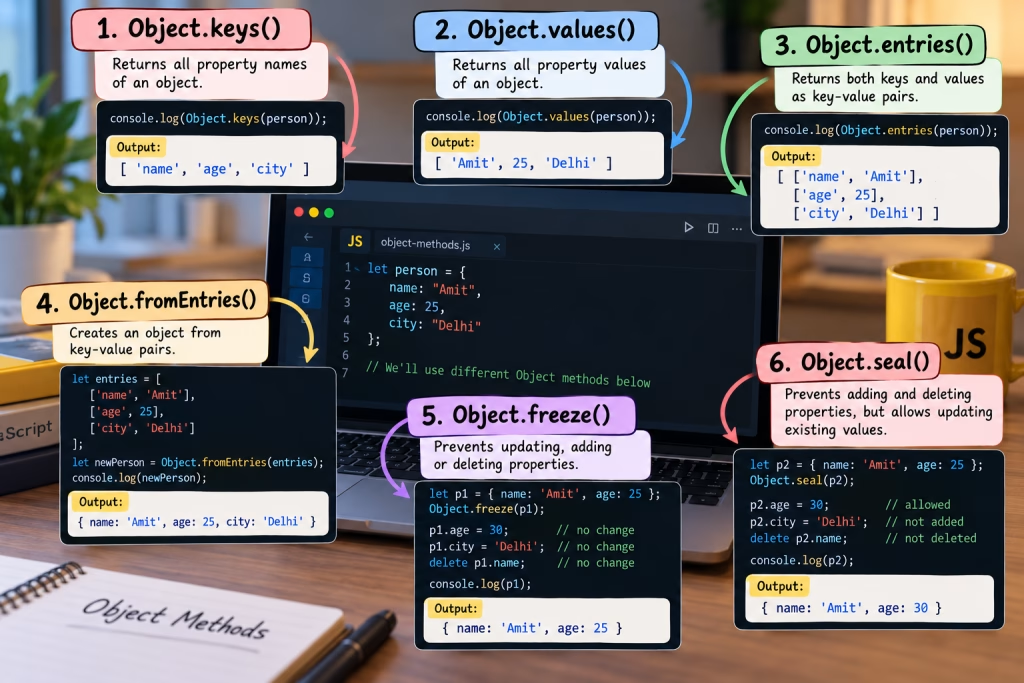
When working with Objects in JavaScript, we need to access, update, and delete properties. However, JavaScript also provides some built-in methods that help us handle Objects easily.
Basically, with the help of these methods, we can easily obtain the keys, values, and key-value pairs of an object. Moreover, we can also restrict objects from being modified.
- Object.keys()
- Object.values()
- Object.entries()
- Object.fromEntries()
- Object.freeze()
- Object.seal()
1. Object.keys()
Object.keys() is used to obtain all the property names, that is, keys, of an object.
For example:
let person = {
name: "Amit",
age: 25,
city: "Delhi"
};
let keys = Object.keys(person);
console.log(keys);
Output:
[“name”, “age”, “city”]
Notice that Object.keys() returns only the property names. It does not return the property values.
Syntax:
Object.keys(object)
Here, object is the object whose keys we need.
Example with Loop
Object.keys(person).forEach(function(key) {
console.log(key);
});
Output:
name age city
Therefore, when we need only the property names of an object, we can use Object.keys().
2. Object.values()
Object.values() is used to obtain all the property values of an object.
let person = {
name: "Amit",
age: 25,
city: "Delhi"
};
let values = Object.values(person);
console.log(values);
Output:
[“Amit”, 25, “Delhi”]
Basically, Object.keys() gives keys, while Object.values() gives values.
Syntax:
Object.values(object)
For example:
console.log(Object.keys(person));
console.log(Object.values(person));
Output:
[“name”, “age”, “city”] [“Amit”, 25, “Delhi”]
In short, Object.keys() is used for property names and Object.values() is used for property values.
3. Object.entries()
Object.entries() is used to obtain both the keys and values of an object together.
let person = {
name: "Amit",
age: 25,
city: "Delhi"
};
let entries = Object.entries(person);
console.log(entries);
Output:
[ [“name”, “Amit”], [“age”, 25], [“city”, “Delhi”] ]
Notice that each key-value pair is returned in the form of a separate array.
For example:
[“name”, “Amit”]
Here, “name” is the key and “Amit” is its value.
Using for…of
for (let [key, value] of Object.entries(person)) {
    console.log(key, value);
}
Output:
name Amit age 25 city Delhi
Basically, Object.entries() is especially useful when we need to work with both the key and value.
Syntax:
Object.entries(object)
4. Object.fromEntries()
Now here is an important method: Object.fromEntries().
Actually, it works in the opposite direction of Object.entries(). It creates an object from key-value pairs.
let entries = [ ["name", "Amit"], ["age", 25], ["city", "Delhi"] ];
let person = Object.fromEntries(entries);
console.log(person);
Output:
{ name: “Amit”, age: 25, city: “Delhi” }
Syntax:
Object.fromEntries(iterable)
Here, iterable should contain key-value pairs, generally in the form of arrays.
In other words:
Object.entries() Object | v Key-Value Pairs Object.fromEntries() Key-Value Pairs | v Object
Moreover, both methods can also be used together during data transformation.
5. Object.freeze()
Object.freeze() is used to freeze an object.
Basically, after freezing, we cannot update, add, or delete the existing properties of the object.
let person = { name: "Amit", age: 25 };
Object.freeze(person);
person.age = 30;
person.city = "Delhi";
delete person.name;
console.log(person);
Output:
{ name: “Amit”, age: 25 }
Notice that the changes were not applied.
Therefore, after Object.freeze():
- We cannot change the value of an existing property.
- We cannot add a new property.
- We cannot delete an existing property.
Syntax:
Object.freeze(object)
Here, object is the object that needs to be frozen.
6. Object.seal()
Object.seal() also restricts an object. However, Object.seal() and Object.freeze() are not the same.
After Object.seal():
- We cannot add a new property.
- We cannot delete an existing property.
- We can update the value of an existing property.
For example:
let person = { name: "Amit", age: 25 };
Object.seal(person);
person.age = 30;
person.city = "Delhi";
delete person.name; console.log(person);
Output:
{ name: “Amit”, age: 30 }
Here, the value of age was updated because we can update existing properties of a sealed object.
However, city was not added and name was not deleted.
Syntax:
Object.seal(object)
Object.freeze() vs Object.seal()
| Operation | Object.freeze() | Object.seal() |
| Existing property update | Not allowed | Allowed |
| New property add | Not allowed | Not allowed |
| Property delete | Not allowed | Not allowed |
Therefore, if we want to completely protect an object from modification, we can use Object.freeze().
On the other hand, if we want to prevent adding and deleting new properties, but want to update existing values, we can use Object.seal().
Summary
| Method | Purpose |
| Object.keys() | Returns the keys of an object |
| Object.values() | Returns the values of an object |
| Object.entries() | Returns the keys and values as pairs |
| Object.fromEntries() | Creates an object from key-value pairs |
| Object.freeze() | Prevents the object from being completely modified |
| Object.seal() | Prevents adding and deleting, but existing values can be updated |
Conclusion
Basically, JavaScript Object Methods are important for efficiently managing objects.
Object.keys() gives us keys, Object.values() gives us values, and Object.entries() gives us both keys and values in the form of key-value pairs.
Similarly, Object.fromEntries() converts key-value pairs back into an object.
Finally, Object.freeze() and Object.seal() control modifications to an object. Keep in mind, freeze() does not allow existing values to be changed, while seal() allows existing values to be updated.